
Intelligent LLM Routing: Cut Costs by 25-70%
We validated intelligent routing on large-scale human preference data and standard reasoning benchmarks. Here's what works and how you can start saving today.

Arian Pasquali
Research Engineer
Key Takeaways
Auto Router could save up to 50% in costs while retaining ~98% of quality
Cost reduction is tunable: teams can dial between ~25% savings at 99.5% quality and ~70% savings at 95% quality, depending on their tolerance
Routing adds under 40ms of overhead per request, imperceptible next to typical LLM completion latency
The problem: one model fits all (and costs like it)
Most teams building with LLMs default to a single model for every request. Usually the most capable one available,"just to be safe."
It works. It's also expensive.
The gap between model tiers is significant. Frontier models (the most capable generation from each provider) often cost several times what their efficient counterparts cost. For applications processing millions of tokens monthly, that overhead adds up fast.
The truth is: a large share of production queries don't need frontier-level reasoning. Simple classifications, basic Q&A, and straightforward summarizations can be handled equally well by more efficient models. The challenge is knowing which queries can be routed to a cheaper model without sacrificing quality.
That's the problem Auto Router solves.
What is Auto Router?
Auto Router is the intelligent routing feature inside the Orq AI Router. It analyzes each incoming prompt in real time and routes it to the most cost-effective model that still meets quality requirements.
Think of it as triage for LLM requests. Not every request needs the specialist; a well-designed routing system sends straightforward cases to efficient models while reserving premium models for the queries that genuinely benefit from them.
The result: better resource allocation, faster response times, and significantly lower costs, without compromising quality where it matters.
How we validated it
Our validation combined two approaches:
Large-scale human preference data. We trained and validated over hundreds of thousands of data points on human preference model comparisons, where real users evaluated outputs from different LLMs on the same prompt. This ensures the router learns patterns grounded in actual human judgment, not proxy metrics.
Standard reasoning benchmarks. We cross-validated on a standard multi-turn reasoning benchmark covering writing, roleplay, reasoning, math, coding, and more. This provides a controlled measurement of the cost-quality tradeoff at different operating points.
The cost-quality tradeoff
The relationship between cost reduction and quality retention is non-linear, and that's what makes routing valuable. Moderate routing preserves nearly all quality while cutting costs substantially.
Premium model usage | Quality retained | Cost reduction |
|---|---|---|
75% | ~99.5% | ~25% |
50% | ~98% | ~50% |
25% | ~95% | ~70% |
Results from evaluation on a standard multi-turn reasoning benchmark. Actual savings depend on your model pair, traffic mix, and threshold configuration.
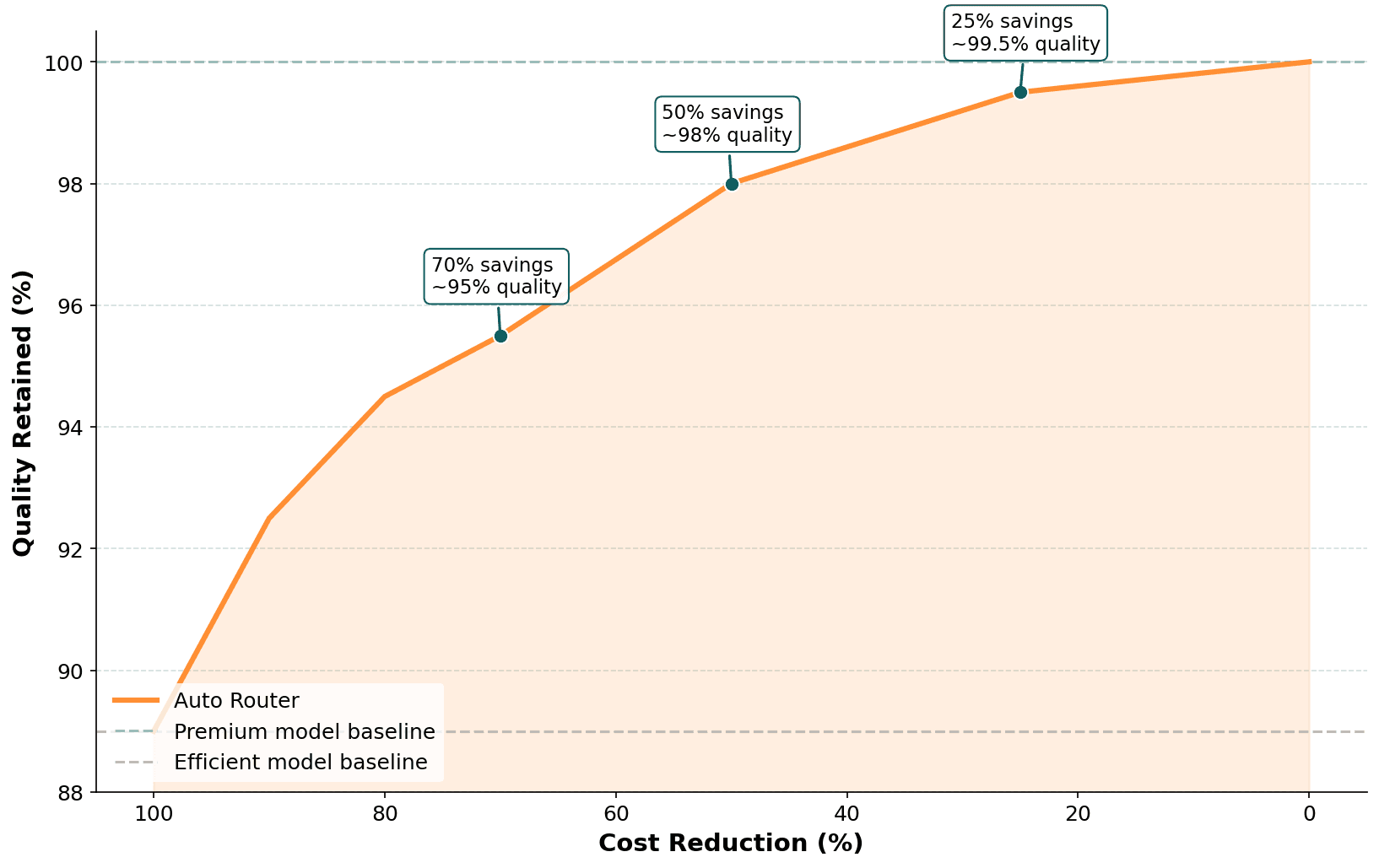
For most production applications, the 50% operating point represents a strong default: 98% quality retention at roughly half the cost. Teams with tighter quality requirements can dial back to 75% premium usage (~25% savings, negligible quality impact). Teams optimizing aggressively for cost can push to 25% premium usage and still retain 95% of quality.
What the Router adds to latency
Total routing overhead -- prompt analysis, scoring, and decision logic, adds under 40ms per request. Given typical LLM completion latency of 500-3000ms, routing overhead represents less than 5% of total response time. It's imperceptible to end users.
What works in practice
We analyzed hundreds of model pair combinations to understand where routing performs well and where it breaks down. Clear patterns emerged.
Routing works best when:
Models are from the same family with clear tier separation, and you route between frontier and budget variants. Provider hierarchies (premium, standard, budget) work well because the capability gap is well-defined. Standard-to-mini (or -small, -flash) pairs share a common foundation. The efficient variant trades some capability for cost and speed, and this pattern works both within and across providers.
For horizontal differentiation (e.g., different providers or model strengths), the difference is clear. When models differ by skill or domain (e.g., one stronger at coding, another at reasoning or a specific domain), the router can reliably send each query to the model that fits. The more clearly strengths and weaknesses are separated, the better the routing accuracy.
How to ship routing safely
Auto Router is designed to integrate with the operational controls already built into the Orq AI Router. Here's a practical checklist for getting started:
1. Pick a safe model pair. Start with a same-family pair where one model is clearly more capable (and more expensive) than the other. Standard-to-mini variants are the safest starting point.
2. Pick a target savings level. Decide your quality tolerance. For most teams, the 50% operating point (~98% quality, ~50% savings) is a strong default.
3. Set your threshold and measure. Configure your routing threshold in AI Router and monitor the results. Track cost per query, quality metrics, and routing distribution.
4. Use fallbacks. Pair Auto Router with AI Router's built-in fallback chains, retries, and timeouts. If the efficient model fails or returns a low-confidence response, traffic escalates to the premium model automatically.
5. Iterate. Adjust thresholds based on observed quality. Tighten if you see quality dips; loosen if quality is consistently high and you want more savings.
What you get out of the box
Auto Router works within AI Router's existing production infrastructure:
Fallback chains: automatic escalation when the routed model fails
Retries and timeouts: built for production traffic
Budget controls: track tokens and costs in real time, set limits
Observability: see every routing decision end to end, what was routed where, why, and at what cost
Conclusion
Intelligent LLM routing isn't about always choosing the cheapest model. It's about matching model capability to query requirements, and doing so automatically, in real time.
Our validation on large-scale human preference data and standard reasoning benchmarks shows that:
~50% cost reduction at ~98% quality retention is achievable with well-chosen model pairs
Same-family tier routing is the safest and most effective pattern
Some combinations should be avoided, thinking variants, cross-architecture pairs, and closely matched models
Routing overhead is negligible, under 40ms per request
The cost-quality tradeoff is tunable. Auto Router lets you dial between conservative (high quality, moderate savings) and aggressive (significant savings, small quality delta) based on your requirements.
Results depend on model pair selection, traffic mix, and threshold configuration. We recommend starting with a same-family pair at the 50% operating point and iterating from there.
Want to see what Auto Router looks like on your traffic? Book a demo to explore intelligent routing with your team.
This research was conducted by the Orq.ai Labs team. For questions or collaboration, contact us.